Home
- LEDsaddremove
- Componentsaddremove
- Power suppliesaddremove
- LED strips
- LED modules
- Aluminum profiles and accessoriesaddremove
- LED, CCFL rings
- Lampsaddremove
- Car bulbsaddremove
- Accessoriesaddremove
- Smart homeaddremove
- Shielding technologyaddremove
- Metal fireplaces

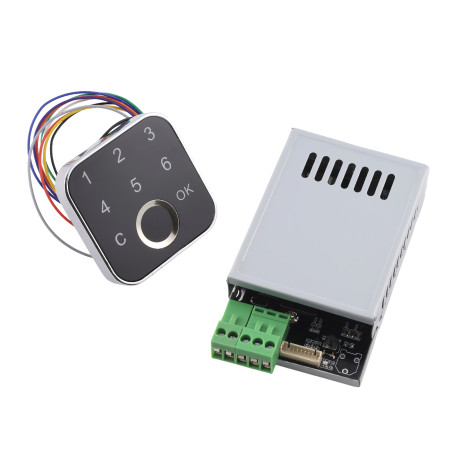


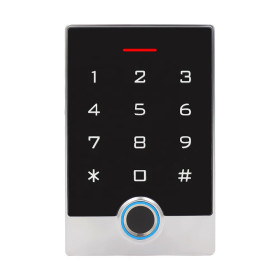
Relay switching module with reader and keyboard K226+G16, 10-30V DC
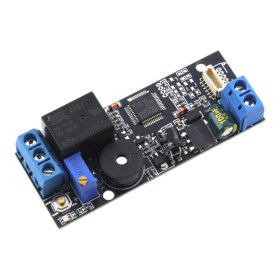
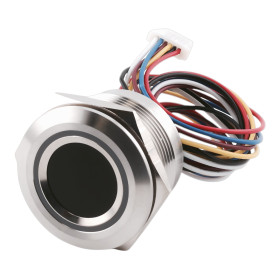
The K226 + G16 kit is an advanced access system combining a control board and an external fingerprint reader. By connecting with the G16, it offers secure and convenient control of electronic locks and other devices. It allows the management of multiple administrators, users and one-time passwords and provides up to four relay control modes. This kit is an ideal choice for installations requiring flexible and reliable security.
Technical specifications
- Power supply: DC 10-30V
- Standby consumption: 6 mA (at 12 V)
- Output: relay (max. current 10 A)
- Adjustable relay switching time: 0.5 s - 30 minutes
- Fingerprint capacity:
- Administrator: up to 40 fingerprints
- User: up to 60 fingerprints (2 databases of 30 each)
- Password capacity:
- Administrator: up to 5 groups
- User: up to 5 groups (3-9 digits)
- Disposable: up to 5 groups
- Control: SET button, fingerprint, password
- G16 reader: external fingerprint sensor with LED indication
Functions and features
- Combination of biometric identification and password access
- Simple user registration directly via the G16 reader
- Support for administrator and user accounts
- Option for one-time passwords for temporary access
- Four relay control modes – time, momentary, latching without memory, latching with memory
- Possibility to set the relay to switch on for up to 30 minutes
- Status indication using LED reader G16
Relay modes
- Mode 1 (time): The relay switches on for the set time (0.5 s – 30 minutes).
- Mode 2 (momentary): The relay remains closed only as long as the finger is applied.
- Mode 3 (self-latching without memory): First finger touch → relay closes, second touch → relay closes. The relay state is not saved after power is disconnected.
- Mode 4 (latching with memory): Same as mode 3, but the relay remembers the state even after a power failure.
Ideal for
- Electronic door locks
- Access systems for homes and businesses
- Control of relays and electrical appliances
- Security systems requiring a higher level of protection
Package contents
- Control board K226
- G16 Fingerprint Reader
- Connectors for wiring
- User manual (EN)
Why choose this set?
- Combination of G16 reader and K226 control board for maximum flexibility
- Support for multiple administrators, users and one-time passwords
- Four relay control modes adaptable to specific applications
- Easy installation and intuitive management
- Reliable LED signaling for clear operation
Instructions for use
- 1. First start: Hold down the SET button for 5-6 seconds to restore factory settings.
- 2. Administrator registration: Short press SET, the blue LED on G16 flashes quickly. Place your finger repeatedly until you hear a musical tone. Up to 40 fingerprints can be stored.
- 3. User registration: Log in with the administrator fingerprint or password. Select the database (1 or 2) and attach the user's finger. Each database allows 30 fingerprints.
- 4. Password settings: The administrator can add up to 5 passwords for both users and administrators (3-9 digits). 5 one-time passwords can also be set.
- 5. Relay settings: Log in as administrator and select mode (1-4). For time mode, set the switching time (0.5 s - 30 minutes).
- 6. Usage: Access is possible by placing a registered finger on the G16, entering a password or one-time password.

- Voltage
- 10-30 V DC
- Waterproof grade
- IP22
This manual describes commissioning, user management (fingerprint / password), relay mode settings, and troubleshooting for the K226 + G16 control board. Always start with factory reset initialization, then register an administrator, and subsequently set up users and the relay mode as needed.
Safety and Usage Guidelines
- Power only with DC voltage within the permitted range. Ensure correct polarity.
- Do not connect loads exceeding the relay’s maximum current. Use a suitable fuse.
- Protect the board from moisture, conductive dust, and mechanical damage.
- Always disconnect power before wiring or making changes to the cabling.
Technical Specifications
- Power supply: DC 10–30 V
- Standby current: approx. 6 mA (at 12 V)
- Output: relay, max. current 10 A
- Fingerprint capacity: administrator up to 40; users up to 60 (2 databases × 30)
- Passwords: administrator up to 5 groups; user up to 5 groups; length 3–9 characters
- One-time passwords: up to 5 groups (automatically invalid after use)
- Management: via SET button, administrator fingerprint, or administrator password
Description of Controls and Indicators
- SET button – basic management (registration, reset, relay time setup).
- Keypad – confirm OK, delete C (long press = “reset/delete” for the selected function).
- Reader LED panel – color states (pink/red/blue) indicate registration or reset modes.
First Start and Factory Reset
- Initialization (Factory Reset): hold SET for approx. 5–6 s; after a long beep and melody (LED changes pink → red → blue), initialization is complete.
- After initialization, first register an administrator, only then add users.
Administrator Registration (Fingerprint)
- Briefly press SET; fast flashing blue LED indicates registration mode.
- Place your finger on the sensor several times until a melody is heard (success). Multiple fingerprints can be registered in succession.
- After 40 administrator fingerprints are stored, short press of SET starts registering user fingerprints.
Quick Start – Short Procedure
- Factory reset (hold SET for 5–6 s).
- Register administrator fingerprint (short press SET → scan finger).
- Set relay mode (see “Relay Modes”).
- Optionally add administrator passwords, user fingerprints/passwords, and one-time passwords.
Entering Edit Mode (Management via Keypad)
- For all keypad operations below, you must first authenticate with an administrator fingerprint or administrator password (enter password and confirm OK).
Administrator Functions (Keypad)
- Add administrator fingerprint: 1【OK】 → scan finger(s) until confirmed by melody.
- Delete all / restore factory settings: 1【C】 (hold C).
- Set administrator password (up to 5 groups): 2【OK】 new password 【OK】.
- Delete administrator passwords: 2【C】 (hold C).
User Functions (Keypad)
- Add user fingerprint: 3【OK】 database(1 or 2)【OK】 → scan finger(s).
- Delete user fingerprints: 3【C】 database(1 or 2)【C】 (hold second C).
- Set user password (up to 5 groups): 4【OK】 new password 【OK】.
- Delete user passwords: 4【C】 (hold C).
- Set one-time password (up to 5 groups): 6【OK】 new password 【OK】.
- Delete all one-time passwords: 6【C】 (hold C).
Relay Modes
- Entry: after administrator authentication, enter 5【OK】 mode 1–4 【OK】.
- Mode 1: relay switches ON for a set time (approx. 0.5 s to 30 min).
- Mode 2: relay stays ON only while finger is placed on the sensor.
- Mode 3: toggle: place finger = ON; place again = OFF; state is not saved after power loss.
- Mode 4: toggle with state memory during power loss.
Relay ON Time Setting (for Mode 1)
- Hold SET for approx. 2 s, release; fast pink flashing = time setup mode.
- Press and hold SET for the desired duration; the press length defines relay ON time (0.5 s to 30 min).
Registration Rules and Warnings
- Administrator fingerprints must not be the same as user fingerprints.
- User passwords must not duplicate administrator passwords.
- If a one-time password matches an existing password, the one-time password takes priority.
Troubleshooting
- Cannot add fingerprint: database full or role duplication. Delete items and try again.
- Password not working: check password type (admin/user) and length 3–9 characters; for one-time passwords, check if it has already been used.
- Relay does not switch as expected: check the selected mode, and for Mode 1 also the time set with the SET button.
Firmware Notes
- V1.2 (11/2021): added function 1.3 – relay ON time up to 30 min; changed setup method (hold/press SET).
EU Importer: AMPUL SYSTEM s.r.o., Čsl. armády 641/40, 78701 Šumperk, Czech Republic,