Home
- LEDsaddremove
- Componentsaddremove
- Power suppliesaddremove
- LED strips
- LED modules
- Aluminum profiles and accessoriesaddremove
- LED, CCFL rings
- Lampsaddremove
- Car bulbsaddremove
- Accessoriesaddremove
- Smart homeaddremove
- Shielding technologyaddremove
- Metal fireplaces

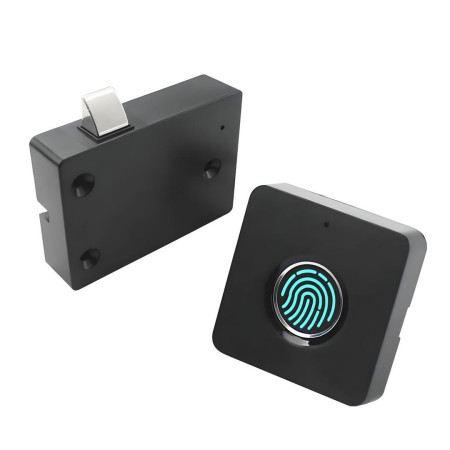


Furniture lock for drawers and cabinets SYP02 fingerprint, black
The SYP02 electronic fingerprint lock is a modern solution for securing drawers, furniture cabinets and lightweight aluminum doors without the need for a key. Thanks to its biometric fingerprint sensor, it offers fast and convenient unlocking, while its compact design allows for discreet installation in office and home furniture.
Technical specifications
- Model: SYP02
- Lock type: electronic fingerprint lock
- Applications: drawers, cabinets, lightweight aluminum doors
- Color: black
- Body material: ABS plastic
- Power supply: built-in lithium-ion battery
- Battery capacity: 500mAh
- Charging: USB (emergency power)
- Sensor type: solid-state fingerprint sensor
- Memory capacity: up to 20 fingerprints
- Recognition speed: ≤ 0.3 s
- Operating temperature: −20 to +65 °C
- Lock body dimensions: 87.9 × 65 × 22.2 mm
- Fingerprint panel dimensions: 30.3 × 30.2 × 7 mm
- Weight: 180g
- Protection: IP20
Functions and features
- Biometric fingerprint unlocking without the need for a key
- 360° fingerprint recognition for convenient use
- Ability to store up to 20 user fingerprints
- Fast unlocking response
- Built-in long-lasting battery
- USB interface for emergency power supply when the battery is low
- Compact design suitable for concealed mounting
Ideal for
- Office drawers and containers
- Furniture cabinets in the home
- Storage spaces without high security class requirements
- Protection of personal documents and small items
Package contents
- Fingerprint lock SYP02
- Fingerprint reader panel
- Counterpiece (latch)
- Mounting kit
Why choose this product?
- Convenient keyless unlocking
- Modern biometric technology
- Easy installation into furniture
- Emergency USB power for maximum reliability
- Ideal price-performance ratio for furniture applications

- Capacity
- 500 mAh
- Waterproof grade
- IP20
Electronic fingerprint lock. This manual describes fingerprint registration, unlocking/locking, deleting fingerprints, and important notices.
Indicators (LED)
- Blue: setup mode / confirmation / reset after unlocking
- Green: successful operation (fingerprint saved, correct recognition)
- Red: error / unsuccessful recognition / prompt to repeat
Adding a fingerprint (registration)
- Place and hold your finger on the sensor for approximately 5 seconds.
- Wait until the blue indicator starts flashing.
- Remove your finger – the blue indicator stays on steadily (registration mode).
- Place the finger you want to save on the sensor.
- Green flashes once = one scan has been saved.
- Remove your finger and place it again until there have been 5 successful placements in total.
- If the red light comes on during saving, place your finger one more time.
- After 5 successful placements, the green light turns on for 1 second = registration is complete.
Important: The first 3 saved fingerprints are administrator fingerprints. To add more fingerprints, administrator verification is required (during the registration process).
Unlocking / locking (normal use)
- Place a finger that has been successfully registered.
- Green flashes once = fingerprint recognized, the lock unlocks.
- If the red light flashes when placing your finger, recognition failed – place your finger again.
- After unlocking, the blue light turns on for 1 second and the lock automatically returns to locked mode.
Deleting fingerprints (reset)
This operation deletes all saved fingerprints.
- Place and hold your finger on the sensor for approximately 10 seconds.
- While holding, the blue light will flash first, then the red light will start flashing.
- Once the red light is flashing, remove your finger.
- Verify the administrator: place an administrator finger (the first 3 saved fingerprints).
- Green for 1 second = all fingerprints have been successfully deleted.
Notices
- Emergency power: If the battery is depleted and the lock cannot be unlocked, use the USB port and an external power source (e.g. a power bank).
- No saved fingerprints: If the lock has no saved fingerprints, it can be unlocked by any finger.
- Recommendation: Ideally, use the lock only after it has been fully charged.
EU Importer: AMPUL SYSTEM s.r.o., Čsl. armády 641/40, 78701 Šumperk, Czech Republic,